
FREE SECURITY PLAYBOOK • OCTOBER 2026
Three Fronts of AI Risk: A Security Playbook for Bay Area Businesses
How to protect your organization from AI-powered attackers, risky employee AI use, and the AI platforms and integrations you connect. Plain English, with a 30/60/90-day roadmap and free templates.
By PC Professional • Reviewed by Dan Sanguinetti, CEO & Founder • Published October 2026 • 25 min read



Download the Full Playbook
PDF plus editable AI policy, roadmap, and checklist templates.
We’ll email you the files instantly. No spam; unsubscribe anytime.
Executive Summary
Short answer: AI has not invented a new kind of cybercrime. AI has made phishing, payment fraud, and exploitation faster, cheaper, and more convincing, while employee AI use and connected AI tools open two new fronts.
In 2025, the FBI added an artificial intelligence section to its annual Internet Crime Report for the first time, recording more than 22,000 complaints that reported AI-related information and over $893 million in adjusted losses tied to those complaints [1]. IBM’s 2026 Cost of a Data Breach study of 602 breached organizations found that one in four malicious breaches were AI-enabled, mostly through deepfake impersonation and AI-enabled malware [2]. A peer-
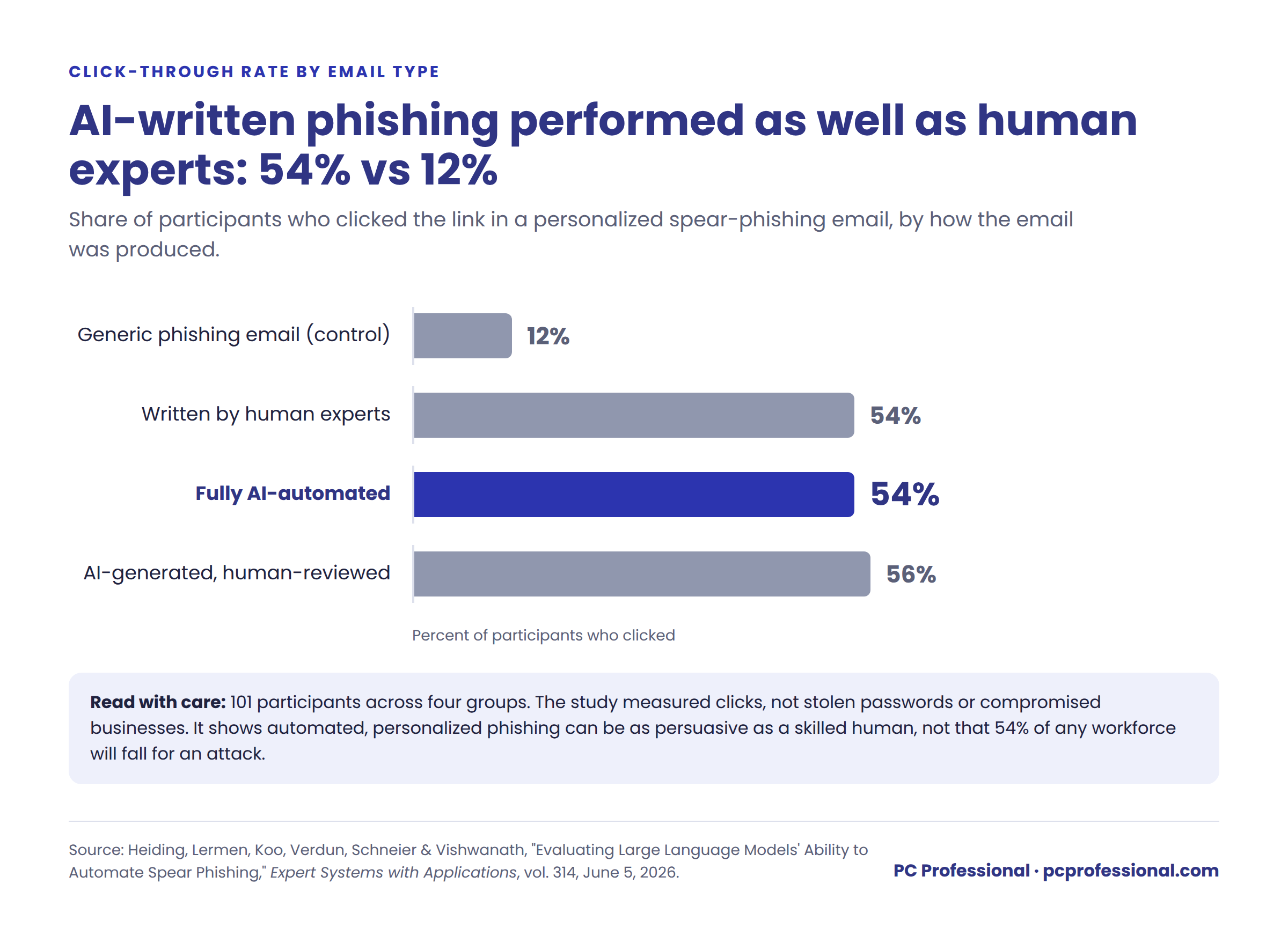
reviewed experiment published in June 2026 found that fully automated, AI-personalized phishing emails drew clicks from 54% of recipients, compared with 12% for a generic phishing email [4].
Employee use of AI is a second front. Among the breached organizations IBM studied in 2026, 43% reported incidents involving “shadow AI,” meaning AI tools used without the organization’s approval, up from 20% a year earlier [2]. In a May 2026 survey of workers at large companies that provide paid AI tools, 79% said they had entered sensitive information into AI, including 31% who had entered logins or API keys [8].
The third front opens when a business connects AI to its own systems: assistants that read email and files, public chatbots, and AI agents that take actions. More than 20% of organizations in IBM’s 2026 study reported a breach targeting AI models or applications, most often through compromised APIs, applications, or plug-ins, or through cloud misconfigurations [2].
The Bottom Line: Most of the protection a small or mid-sized organization needs against AI-related threats comes from fundamentals done well: phishing-resistant sign-in for critical accounts, an out-of-band payment verification process, a written AI policy backed by technical controls, clean file permissions, tightly scoped AI integrations, prioritized patching, monitoring, and backups that have actually been restored. None of these require an enterprise budget. All of them require an owner and a plan.
AI Security by the Numbers
Short answer: AI is increasing the scale and sophistication of cyber threats, while gaps in governance, access controls, and employee practices leave organizations exposed. Recent data highlights rising AI-related losses, ransomware, software vulnerabilities, and the growing role of automation in phishing and cyberattacks.
The figures below come from primary sources published between April 2024 and September 2026. Each figure describes a specific population, noted in the table, and should not be read as the probability that any given business will experience the same outcome. Numbers in brackets refer to the reference list at the end of this playbook.
| Finding | Population Measured | Source |
|---|---|---|
| 22,364 complaints reported AI-related information, with more than $893 million in adjusted losses; first year the FBI reported AI separately | Complaints filed with the FBI IC3 in 2025 | FBI IC3 [1] |
| More than $30 million in business email compromise losses involved AI, within $3.05 billion in total BEC losses | Complaints filed with the FBI IC3 in 2025 | FBI IC3 [1] |
| 1 in 4 malicious breaches were AI-enabled, averaging about $6 million per breach versus a $4.99 million global average | 602 breached organizations, Mar 2025-Feb 2026 | IBM 2026 [2] |
| 43% reported incidents involving shadow AI, up from 20% the prior year | Same IBM breach study | IBM 2026 [2] |
| More than 20% reported a breach targeting AI models or applications; compromised APIs, apps, or plug-ins and cloud misconfigurations were each cited by 27% | Same IBM breach study | IBM 2026 [2] |
| 68% lacked AI governance policies; only 40% applied access controls to AI models and data | Same IBM breach study | IBM 2026 [2] |
| 54% clicked fully AI-automated spear-phishing emails, versus 12% for a generic phishing email | 101 participants across 4 experimental groups; clicks, not credential theft | Heiding et al. 2026 [4] |
| 31% of breaches began with exploitation of a software vulnerability, now the top initial access vector | Breaches analyzed Nov 2024-Oct 2025 | Verizon DBIR 2026 [3] |
| 48% of breaches involved ransomware | Same verizon dataset | Verizon DBIR 2026 [3] |
| 79% had entered sensitive information into AI tools; 31% had entered logins or API keys | 1,005 U.S. workers at companies with 500+ employees that provide paid AI tools, May 2026 | Zapier [8] |
| 50% had worked around workplace AI restrictions | Same Zapier survey | Zapier [8] |
| AI performed an estimated 80-90% of a state-sponsored espionage campaign, with humans involved at roughly 4-6 decision points | One campaign against ~30 organizations, disclosed Nov 2025 | Anthropic [5] |
Why This Hits Close to Home
in the Bay Area
Short answer: Bay Area organizations face growing risks from vendor fraud, ransomware, and system disruptions, while California’s evolving privacy laws add strict breach notification deadlines and new compliance obligations. Proactive cybersecurity and clear AI governance help organizations protect sensitive data and prepare for these risks.
Bay Area organizations combine early AI adoption, valuable data, and dense vendor relationships. Employees here tend to try new AI tools quickly. Firms in legal, finance, manufacturing, and the nonprofit sector hold exactly the data and payment flows attackers want. And organizations in the region are already being hit.
Recent local incidents
- City of Pittsburg (incident February 12, 2026; publicly disclosed August 5, 2026): An email impersonating a known city vendor led to an unauthorized ACH payment of $913,839, discovered five days later. Police froze the receiving account and recovered about $696,000; the city is pursuing the remainder through insurance [19][20].
- Foster City (March 19, 2026): A ransomware attack forced the San Mateo County city to suspend non-emergency services and declare a local emergency [21].
- Suisun City (August 7, 2026): Malware disrupted city systems, including 911 routing, which was temporarily redirected to Solano County dispatch. City departments did not fully reopen to the public until September 22, and a federal investigation is ongoing [22][23].

These incidents involved public agencies rather than private companies, and public reports have not attributed any of them to AI. They matter to private organizations because vendor impersonation, ransomware, and credential theft are exactly the techniques AI is making cheaper to run against everyone.
California Rules Raise the Stakes
California’s breach notification law now sets a 30-day clock. Since January 1, 2026, a person or business that owns or licenses computerized data containing defined categories of unencrypted personal information must notify affected California residents within 30 calendar days of discovering or being notified of a qualifying breach [17]. Key details:
- Permitted delays are narrow. The deadline can accommodate the legitimate needs of law enforcement and the measures necessary to determine the scope of the breach and restore the reasonable integrity of the data system.
- Service providers have their own duty. A business that maintains covered data on behalf of another organization must notify the owner or licensee immediately following discovery.
- The Attorney General gets a copy. When notice goes to more than 500 California residents, a sample copy must be submitted to the Attorney General within 15 calendar days of notifying affected consumers.
New California privacy regulations add further obligations for businesses covered by the California Consumer Privacy Act (CCPA) [18]:
- Risk assessments: Requirements took effect January 1, 2026, for covered processing activities. Assessments for activities that began before 2026 and continue must be completed by December 31, 2027, with the first attestations due April 1, 2028.
- Automated decision-making technology (ADMT): Businesses that use technology to replace or substantially replace human decision-making for significant decisions about consumers, such as employment, lending, housing, education, or health care, must comply with notice, opt-out, and related requirements beginning January 1, 2027.
- Cybersecurity audits: Annual independent audits apply to CCPA-covered businesses whose processing presents significant security risk under the regulation’s criteria. For businesses that meet those criteria, revenue determines the first due date: April 1, 2029 (over $100 million), April 1, 2029 ($50 to $100 million), or April 1, 2030 (under $50 million).
Whether and how these rules apply depends on the organization, its data, and its activities. Review them with qualified counsel.
The Three Fronts of AI Risk
AI risk reaches an organization from three directions at once. Treating AI security as a single problem leaves blind spots. Treating it as three connected fronts makes it manageable.

This structure aligns with the draft Cyber AI Profile released by the National Institute of Standards and Technology (NIST) in December 2025, which organizes AI security around securing AI systems, using AI for defense, and thwarting AI-enabled attacks [13].
Front 1: Outside Attackers Using AI
Short answer: AI enables attackers to create convincing phishing messages, impersonate executives with deepfake voices and video, exploit software vulnerabilities faster, and automate attacks at scale. Defenses should prioritize phishing-resistant MFA, independent payment verification, rapid patching, continuous monitoring, and realistic employee training.
Attackers use AI to do the same jobs they have always done, only faster and with fewer tell-tale mistakes. Four patterns stand out.
1. Phishing that no longer looks like phishing
Employees have long been trained to spot bad grammar, odd formatting, and generic greetings. AI removes all three. In a peer-reviewed experiment co-authored by security researcher Bruce Schneier, an AI tool researched each participant from public information and wrote a personalized email with no human help. Those emails drew a 54% click rate, matching emails written by human experts, versus 12% for a generic phishing email [4].
The study had clear limits: 101 participants across four experimental groups, and it measured clicks rather than stolen passwords or compromised businesses. The takeaway is not that 54% of your staff will fall for an attack. The takeaway is that automated, personalized phishing can be as persuasive as a skilled human attacker, and authors estimate it can make large campaigns far more profitable to run [4]. Tailored attacks once reserved for large enterprises are becoming economical against smaller organizations.
Verizon’s 2026 report adds a mobile dimension: in phishing simulations, mobile-based lures drew about 40% higher engagement than email [3]. Many employees read work messages on personal phones that company filters do not reach.
2. Deepfake voices and video in payment fraud
Voice cloning requires only a short sample of someone’s speech, which is easy to find in webinars, podcasts, and social media videos. In a widely reported 2024 case, an employee at the engineering firm Arup transferred about $25 million after a video call in which the “CFO” and several “colleagues” were deepfakes [6]. In September 2026, Reuters reported, citing two sources, that fraudsters diverted €95 million (about $108 million) from Fideuram, the private banking arm of Italy’s Intesa Sanpaolo. The scheme reportedly began with a message impersonating the group’s CEO, followed by a phone call using an AI-cloned voice of a senior law-firm partner to make the request seem legitimate. More than half of the money was recovered [7].
Smaller organizations face the same play at smaller scale: a cloned voice of the owner asking the bookkeeper for an urgent wire, or an AI-written email from a “vendor” announcing new bank details. The FBI recorded more than $30 million in business email compromise losses involving AI in 2025 [1]. The real figure is likely higher, because victims often cannot tell whether AI was involved.
Recognizing a voice or a face is not authorization
A familiar voice on the phone or a familiar face on a video call no longer proves who is asking. Payment and bank-detail requests must be verified through a separate channel the requester did not supply, and approved through a separate process, every time.
3. Faster exploitation of unpatched systems
Exploitation of a known software flaw overtook stolen credentials as the leading way attackers got in, accounting for 31% of breaches in Verizon’s 2026 report [3]. Verizon identified 15 attack techniques that generative AI is now enhancing, from finding weaknesses to developing malware [3]. The gap between a flaw becoming public and attackers using it keeps shrinking.
4. Attacks that run themselves
In November 2025, AI company Anthropic disclosed that a state-sponsored group had used its AI coding tool to run a cyber-espionage campaign against about 30 organizations, with AI performing an estimated 80% to 90% of the work [5]. Nation-state operations are not the typical threat to a 60-person accounting firm, but the lesson carries down: as the labor cost of attacking falls, more organizations become worth attacking.
How to defend Front 1
- Adopt phishing-resistant MFA, starting with privileged accounts. Phishing-resistant MFA means FIDO2/WebAuthn passkeys or hardware security keys. Put it first on administrator, email, finance, remote-access, and IT provider accounts, then extend it to everyone.
- Use number matching as an interim step only. Authenticator app number matching blocks “approval fatigue” attacks and is far better than text-message codes, but CISA describes it as an interim mitigation for organizations not yet able to deploy phishing-resistant MFA, not a replacement for it [14].
- Verify every payment change out of band. Any request to send money, change bank details, or buy gift cards is confirmed by calling a phone number already on file from a prior, trusted record, never one supplied in the request. Require a second person to approve new payees and bank-account charges.
- Treat code words as optional backup, not a control. A shared phrase between executives and finance staff can add friction for an impersonator, but code words can be overheard, stolen, or socially engineered. Callback verification and dual approval remain the controls that matter.
- Lock down email authentication. SPF, DKIM, and enforced DMARC policy make it much harder for attackers to send email that appears to come from your domain.
- Prioritize patching by real-world risk. Fix vulnerabilities listed in CISA’s Known Exploited Vulnerabilities catalog and flaws in internet-facing systems (firewalls, VPNs, remote access, web applications) first and fastest, typically within days [15]. Handle other critical updates on a defined, shorter cycle than routine patches.
- Monitor around the clock. Attacks rarely start at 10a.m. on a Tuesday. Continuous monitoring and alerting on endpoints, email, and cloud accounts catch activity outside business hours.
- Train with realistic simulations, including text-message and voice scenarios. Teach employees to verify the request through a trusted channel rather than judge the writing or the voice.
Front 2: Employees and Shadow AI
Short answer: Shadow AI can expose sensitive client data, credentials, and confidential business information when employees use unapproved tools or personal accounts. Organizations can reduce these risks with clear AI usage policies, approved business tools, technical controls, and practical employee training.
Shadow AI is the use of AI tools at work without the organization’s knowledge or approval. Employees are usually trying to write the proposal faster, summarize the contract, or fix the spreadsheet forum
What the data shows
- In a May 2026 survey of 1,005 U.S. workers at companies with 500 or more employees that provide paid AI tools, 79% had entered sensitive information into AI tools, and 31% had entered login credentials or API keys [8].
- Half of these workers had found ways around their employer’s AI restrictions [8].
- A 2026 enterprise study by data-security firm Cyberhaven found that about 40% of AI interactions involved sensitive data, with a substantial share of AI use running through personal rather than corporate accounts [9].
- Among breached organizations in IBM’s 2026 study, 43% reported incidents involving shadow AI and 68% lacked AI governance policies [2].
These surveys describe larger companies, and several describe organizations that already provide approved AI tools. Smaller Bay Area organizations should treat the figures as directional. Smaller firms, however, often have fewer controls in place, not more.
Why personal AI accounts are the core problem
When an employee pastes a client file into a free or personal AI account, the organization’s control over that data can be substantially limited. Depending on the provider, account typer, and settings, the content may be retained, reviewed, or used to improve the service, and the organization may have limited ability to see, delete, or retrieve it for a legal hold or investigation. For law firms, accounting firms, and nonprofits holding client or donor records, that can raise confidentiality and compliance questions on top of the security risk.
How to defend Front 2
- Adopt a tiered AI Acceptable Use Policy. Separate what is always prohibited, what is restricted to approved tools and uses, and what is generally permitted. A starter template appears at the end of this playbook.
- Approve tools specifically, not generally. Each approval should name the tool, the account type (company-managed only), the data classes allowed, and the permitted uses. A business subscription alone does not mean every feature, plug-in, or connector is appropriate.
- Give people a sanctioned alternative. Banning AI outright drives it underground. A business-grade AI tool tied to company sign=in, with data-retention and model-training settings reviewed, gives employees the speed they want inside controls the organization manages.
- Back the policy with technical controls. Use single sign-on for approved AI tools, data loss prevention and sensitivity labels for regulated and confidential data, and web or cloud-app filtering to limit personal AI accounts on company devices where appropriate.
- Control browser extensions and add-ons. Many AI tools arrive as browser extensions that can read every page an employee views. Allow only approved extensions on managed devices.
- Discover what is already in use. Review sign-in logs, connected apps, OAuth grants, and extensions to find AI tools employees have already adopted.
- Train people on the tiers. In the Zapier survey, 82% of workers who felt fully confident about what was safe to share had received formal AI training [8]. The survey does not show that training cause that confidence, but clear training on concrete examples is inexpensive relative to a breach.
- Keep secrets out of prompts entirely. Use a company password manager and secrets vault so credentials never need to be copied into any tool. Rotate any key that has been pasted into an AI tool.
Front 3: AI Platforms, Integrations, and Internal Systems
Short answer: Connecting AI to business systems can introduce new paths for data exposure, prompt injection, compromised integrations, and unauthorized actions. Organizations should limit AI access, secure connectors and networks, validate outputs, require human approval for high-risk actions, and maintain clear monitoring and incident response procedures.
The third front opens when an organization connects AI to its own data, applications, and network. AI assistants that read email and files, website chatbots, and AI agents that send messages or update records create new ways in and new ways for mistakes to spread. IN IBM’s 2026 study, more than 20% of breached organizations reported a breach targeting AI models or applications, and the most common causes were weaknesses in the surrounding systems: compromised APIs, applications, or plug-ins (27%) and cloud misconfigurations affecting AI workloads (27%) [2].
Three ways an AI platform can become the path into your business
| Scenario | What Happens | Controls that Apply Most |
|---|---|---|
| Attackers abuse a platform | Criminals use AI services, or trick your own AI tools through hidden instructions, to extract data or trigger actions. | Least privilege, human approval, output validation, abuse monitoring |
| A provider or integration is compromised | An AI vendor, plug-in, connector, or its stored credentials is breached, exposing whatever it was connected to. | IT-approved connectors, scoped and rotated credentials, vendor contracts, revocation plans |
| An agent acts beyond its authority | An AI agent misreads a goal, is manipulated, or holds broader access than intended, and sends, deletes, or changes things it should not. | Narrow permissions, isolated environments, approvals for consequential actions, kill switch |
Risk 1: AI assistants that see too much
Business AI agents generally respect the file permissions an organization already has. That sounds safe until those permissions are examined. Years of “share with everyone” links, old project folders, and inherited access mean many employees can technically open files they should never see, such as payroll spreadsheets, HR investigations, or partner compensation. Before AI, those files were hard to find. With an AI assistant, anyone can simply ask for them. Cleaning up permissions before rolling out an AI assistant is one of the most important steps on this front.
Risk 2: Prompt injection and manipulated AI tools
Prompt injection is an attack in which hidden or crafted instructions cause an AI tool to ignore its intended rules. The instructions can be typed into a chatbot or hidden inside a document, email, or web page the AI reads. The OWASP GenAI Security Project ranks prompt injection as the number one risk in its 2026 Top 10 for LLM applications, followed by sensitive information disclosure and excessive agency [10]. OWASP also states that it is unclear whether any fool-proof prevention exists [11].
The practical response is containment. Assume an AI tool can be fooled, and design the system so that a fooled AI cannot reach much or do much. Permission limits enforced by the application (not by instructions to the model), human approval for high-risk actions, and validation of AI output before it is used all reduce the consequences [11].
Risk 3: AI agents with too much power
AI agents go beyond answering questions. They send emails, move files, update the CRM, or run code. OWASP’s Top 10 for Agentic Applications, published in December 2025, is led by agent goal hijacking, tool misuse, and identity and privilege abuse [12]. An agent with administrator-level access that gets manipulated can do administrator-level damage.
Risk 4: Internal networks and applications
AI tools increasingly sit inside the network: coding assistants on developer laptops, agents with access to file servers, and integrations that connect cloud AI services to internal databases. Joint guidance from the NSA, CISA, FBI, and international partners on deploying AI systems securely emphasizes controlled API access, segregation of sensitive environments, and incident management planning [16]. For most small and mid-sized organizations, that translates into the controls below.
AI integration and application control table
| Area | What to put in place |
|---|---|
| AI connectors and agents | Require IT approval before any AI tool connects to email, file storage, CRM, finance, HR, or code repositories. Review connection scopes quarterly and revoke unused access and OAuth grants. |
| Internal data access | Enforce user and customer permissions in the application and retrieval layer, so the Ai can only fetch what the requesting user is allowed to see. An instruction telling the model to keep information confidential is not a control. |
| Network access | Run agents and AI automations in isolated environments. Restrict which internal systems and external destinations they can reach. Do not give AI tools unrestricted access to production networks or servers. |
| Network segmentation | Separate production systems, finance, operational technology, guest Wi-Fi, and servers holding sensitive data, so one compromised device, account, or agent cannot reach everything. |
| Application security | Review AI-generated code before it ships. Scan code and dependencies for vulnerabilities and exposed secrets. Validate and sanitize AI output before passing it to databases, web pages, or command execution. |
| Credentials | Store integration keys and tokens in a secrets manager, not in code, scripts, or chat. Give each integration its own narrowly scoped credential and rotate any exposed key immediately. |
| Public chatbots and APIs | Require authentication where appropriate. Set request-rate and spending limits, monitor for abuse, and test whether the chatbot can be pushed into revealing data it should not. |
| Human approval | Require a person to approve AI-initiated payments, deletions, external emails, and permission changes. |
| Logging | Log what AI tools and agents accessed and did, with enough detail to investigate an incident and meet California’s notification timelines. |
| Incident containment | Document how to disable an agent, revoke connector tokens, terminate sessions, and preserve evidence. Test those steps before they are needed. |
| Provider security | Review contract terms on data handling, retention, training use, subprocessors, breach notification, and deletion, along with connector permissions. Certifications alone are not enough. |
The OWASP AI risk lists in plain English
| OWASP risk | What it means for your organization |
|---|---|
| Prompt injection | Hidden or crafted instructions cause the AI to break its rules or leak data. |
| Sensitive information disclosure | The AI reveals confidential data it has access to. |
| Excessive agency | The AI has more permissions or autonomy than the task requires. |
| Supply chain | A third-party model, plug-in, connector, or AI vendor introduces a weakness. |
| Hidden context exposure | Behind-the-scenes instructions or context, sometimes including secrets, get exposed. (Formerly “system prompt leakage”) |
| Improper output handling | AI output is trusted and acted on without validation. |
| Identity and privilege abuse (agents) | An AI agent uses credentials or access it should not have. |
| Memory and context poisoning (agents) | Bad information planted in an agent’s memory steers its future actions. |
What This Means for Your Industry
Short answer: AI-era cyber risks vary by industry: manufacturers face costly downtime, legal and accounting firms must protect client confidentiality, and nonprofits need to preserve donor and community trust. Each can reduce exposure through stronger access controls, clear AI policies, verified payment procedures, and recovery planning tailored to its operations.
Manufacturing and logistics
For manufacturers, the costliest AI-era risk is downtime. Ransomware that reaches production systems stops shipments, and faster exploitation of unpatched equipment and remote-access tools makes that more likely. Vendor-impersonation and deepfake fraud also target purchasing and accounts payable teams that handle frequent supplied payments. Priorities: segment operational systems from the office network, patch internet-facing and remote-access systems first, verify every bank-detail change by callback, and set and test recovery time objectives for production systems.
Legal and accounting firms
For professional services firms, the core AI-era risk is confidentiality. A client matter pasted into a personal AI account can raise professional-responsibility questions. Wire fraud aimed at settlements, closings, and tax refunds is a natural fit for AI-written emails and cloned voices. Priorities: a firm-controlled AI tool with defined permitted uses, a clear rule against client data in personal AI accounts, permission cleanup before AI assistants go live, and dual approval with callback verification for every wire.
Nonprofits
For nonprofits, the AI-era risk is donor and community trust. Nonprofits hold donor payment information, beneficiary records, and grant data, often with lean staff and volunteers who use personal devices and free tools. AI-written emails impersonating an executive director or a funder are hard to spot. Priorities: phishing-resistant MFA for administrators and finance staff, MFA for everyone with system access including volunteers, a short tiered AI policy, and clear rules for donor and client data.
Your 30/60/90-Day AI Security Roadmap
Short answer: A practical 90-day roadmap helps organizations reduce immediate cyber risks, gain visibility into AI use, and build long-term resilience. Prioritize payment safeguards, MFA, and tested backups first, then strengthen AI governance, access controls, monitoring, and incident response with clear owners and documented results.
The roadmap below is sequenced for an organization of 20 to 250 people starting with limited AI controls. Response and recovery come first, because no organization should wait three months to learn whether its backups restore. Assign every action an owner and record evidence when its complete.
Days 1-30: Reduce the biggest risks and prepare to respond
| Action | Owner | Evidence of Completion |
|---|---|---|
| Adopt callback verification and dual approval for all payments, new payees, and bank-detail changes | Finance lead | Written procedure; staff acknowledgement |
| Enable phishing-resistant MFA on administrator, email-admin, finance, and IT provider accounts; MFA for all other users | IT provider | MFA report showing coverage by account type |
| Verify backups by restoring a critical system or data set | IT provider | Successful restore recorded with data and time taken |
| Create an incident contact list: IT provider, cyber insurer, legal counsel, bank, and law enforcement contacts | Operations lead | Contact list stored offline and shared with leadership |
| Publish a one-page tiered AI Acceptable Use Policy | Leadership + IT provider | Signed policy; employee acknowledgements |
| Confirm SPF, DKIM, and DMARC; identify internet-facing systems with known exploited vulnerabilities | IT provider | DNS records verified; remediation list with dates |
Days 31-60: Get visibility and control AI use
| Action | Owner | Evidence of Completion |
|---|---|---|
| Inventory AI tools, browser extensions, and connected apps already in use | IT provider | AI tool inventory with approve/restrict/remove decisions |
| Roll out an approved business AI tool with company sign-in and reviewed data settings | IT provider + leadership | Approved tool list; configuration record |
| Audit file-sharing permissions and remove broad or stale access before enabling AI assistants | IT provider + data owners | Permissions review report; changes logged |
| Deploy or tune data loss prevention and sensitivity labels | IT provider | Policy configuration; test results |
| Run a phishing simulation that includes text-message and voice scenarios | IT provider | Simulation results; follow-up training completed |
| Confirm monitoring covers after-hours activity across endpoints, email, and cloud accounts | IT provider | Monitoring coverage report; test alert received |
Days 61-90: Build resilience
| Action | Owner | Evidence of Completion |
|---|---|---|
| Extend phishing-resistant MFA to all users where practical | IT provider | Updated MFA coverage report |
| Apply least-privilege rules, isolation, and human approval to AI agents and integrations | IT provider | Integration register with scopes and approvers |
| Move integration credentials into a secrets manager; rotate exposed keys | IT provider | Secrets inventory; rotation log |
| Write and tabletop-test an incident response plan built around California’s 30-day notification clock | Leadership + IT provider + counsel | Plan document; tabletop exercise notes |
| Set recovery time objectives for critical systems and test against them | IT provider + operations | Documented objectives; test results |
| Review AI vendor contracts and connector permissions; schedule quarterly reviews | Operations lead | Vendor review checklist; calendar entries |
AI Security Discussion Checklist
This checklist is an informal discussion tool, not a scored assessment. Answer each question Yes, No, or Not applicable. Any “No” on an item marked Critical is a priority gap regardless of how many other items are complete. Use the results to start a conversation with leadership and your IT provider.
Front 1: Outside attackers
| Question | Priority | Answer |
|---|---|---|
| Do administrator, finance, and IT provider accounts use phishing-resistant MFA (passkeys or security keys)? | Critical | Yes | No | N/A |
| Does every user have MFA on email and remote access? | Critical | Yes | No | N/A |
| Is every payment or bank-detail change verified by calling a number already on file? | Critical | Yes | No | N/A |
| Do new payees and bank-account changes require a second person’s approval? | Critical | Yes | No | N/A |
| Are known exploited vulnerabilities and internet-facing systems patched on a priority timeline? | Critical | Yes | No | N/A |
| Are SPF, DKIM, and an enforced DMARC policy in place for your email domain? | Standard | Yes | No | N/A |
| Is network and cloud activity monitored outside business hours? | Standard | Yes | No | N/A |
| Do simulations and training include text-message and voice scenarios? | Standard | Yes | No | N/A |
Front 2: Employees and shadow AI
| Question | Priority | Answer |
|---|---|---|
| Do you have a written, tiered AI Acceptable Use Policy that employees have acknowledged? | Critical | Yes | No | N/A |
| Are passwords, API keys, and other secrets prohibited in prompts, with a password manager in place? | Critical | Yes | No | N/A |
| Have you approved specific business AI tools tied to company sign-in? | Standard | Yes | No | N/A |
| Do you know which AI tools, extensions, and connected apps employees use today? | Standard | Yes | No | N/A |
| Is data loss prevention in place for regulated and confidential data? | Standard | Yes | No | N/A |
| Have employees been trained on the policy tiers with concrete examples? | Standard | Yes | No | N/A |
Front 3: AI platforms, integrations, and internal systems
| Question | Priority | Answer |
|---|---|---|
| Must IT approve any AI connection to email, files, CRM, finance, or code? | Critical | Yes | No | N/A |
| Have backups been restored successfully in the last 90 days? | Critical | Yes | No | N/A |
| Do you have a tested plan to contain an incident and meet a 30-day notification deadline? | Critical | Yes | No | N/A |
| Have file-sharing permissions been reviewed before enabling AI assistants? | Standard | Yes | No | N/A |
| Do AI tools and agents have only the access they need, with human approval for consequential actions? | Standard | Yes | No | N/A |
| Are integration credentials stored in a secrets manager and scoped narrowly? | Standard | Yes | No | N/A |
| Are sensitive systems segmented from general office and guest networks? | Standard | Yes | No | N/A |
| Have you reviewed AI vendors’ data handling, retention, and breach-notification terms? | Standard | Yes | No | N/A |
Starter AI Acceptable Use Policy
Adopt the following template to your organization. Review it with legal counsel and your IT provider before adopting it.
[Organization Name] AI Acceptable Use Policy
Purpose. [Organization Name] supports the use of AI tools to work more efficiently, provided that use protects our clients, donors, employees, and data.
Approved tools. Only tools on the Approved AI Tools list may be used for work, and only through company-managed accounts. Each approval states the tool, account type, permitted data, and permitted uses. Requests for new tools, plug-ins, or connectors go to [name/role].
Always prohibited in any AI tool: passwords, API keys, authentication codes, and other secrets.
Restricted data (approved tools and approved uses only): client, donor, employee, financial, health, and other confidential or regulated information. Use restricted data only in tools and for purposes the Approved AI Tools list expressly allows.
Generally permitted: public information and appropriately de-identified material, subject to the review requirement below.
Personal accounts. Company information may not be entered into personal or free AI accounts.
Review before use. Employees are responsible for checking AI output for accuracy and appropriateness before it is sent to anyone or used in a decision.
Connectors and agents. AI tools that connect to company systems or take actions (sending messages, moving money, changing records) require IT approval, may not hold administrator access, and require human approval for consequential actions.
Reporting. Report suspected misuse, data exposure, or suspicious AI-generated messages to [name/contact] immediately. Rotate any credential that may have been exposed.
Acknowledgement. All employees acknowledge this policy at hire and annually. Effective date: [date].
How PC Professional Helps
PC Professional has supported Bay Area businesses and nonprofits since 1981. The fundamentals that protected organizations through the arrival of the PC, the internet, and the cloud now protect them against AI-related threats. What has changed is how quickly those fundamentals need to be in place.
- AI security readiness reviews that map your exposure across all three fronts and turn this playbook into a prioritized plan with owners and dates.
- Managed cybersecurity including MFA rollout, email authentication, prioritized patch management, and 24/7 monitoring.
- AI policy and safe adoption consulting to select approved tools, clean up permissions before AI assistants go live, scope integrations, and train your team.
- Backup and disaster recovery with defined recovery objectives and regular restore testing. Backups speed recovery from ransomware; preventing and responding to data theft requires the other controls in this playbook.
- Hybrid support from a local team, remote and on-site, with a real PC Professional team member picking up the phone within 15 minutes and flexible agreements without long-term lock-ins.
Get your AI security readiness review
We’ll map your exposure across all three fronts and give you a prioritized plan.
Free Editable Templates
Use them as-is or adapt them with your IT provider.
AI Acceptable Use Policy
Tiered starter policy: prohibited, restricted, and permitted data.
30/60/90-Day Roadmap
Actions with owners, due dates, status, and completion evidence.
AI Security Discussion Checklist
22 questions with critical gaps flagged. Yes, No, or N/A.
Frequently Asked Questions
Shadow AI is the use of AI tools at work without the organization’s knowledge or approval. The risk comes from what employees paste into prompts and which account the data lands in. Client records, credentials, or code entered into a personal AI account can leave the organization’s control. Among breached organizations in IBM’s 2026 study, 43% reported incidents involving shadow AI.
Criminals use AI to write convincing, personalized phishing, to clone voices and faces for payment fraud, and to find and exploit unpatched systems faster. IBM’s 2026 study found one in four malicious breaches were AI-enabled, mostly through deepfake impersonation and AI-enabled malware. The techniques are old; AI makes them cheaper and more believable.
Phishing-resistant multi-factor authentication uses FIDO2/WebAuthn passkeys or hardware security keys, which cannot be tricked into signing in to a fake website. Authenticator app number matching is a useful interim step, but CISA does not consider it phishing-resistant. Start with administrator, email, finance, and IT provider accounts.
A familiar voice or face is no longer proof of identity. Verify every payment, new payee, or bank-detail change by calling a phone number already on file, never one supplied in the request, and require a second person to approve. Code words can add friction but should not be the main control.
Prompt injection is an attack in which hidden or crafted instructions cause an AI tool to ignore its intended rules, for example by leaking data or taking an unintended action. OWASP ranks it the top risk for AI applications and notes there may be no fool-proof prevention. The practical defense is limiting what an AI tool can access and requiring human approval for consequential actions.
Since January 1, 2026, businesses that own or license covered computerized personal information must notify affected California residents within 30 calendar days of discovering or being notified of a qualifying breach, with limited permitted delays. When more than 500 residents are notified, a sample notice goes to the Attorney General within 15 days. This is general information, not legal advice.
A blanket ban usually drives AI use underground: in one 2026 survey, half of workers had worked around workplace AI restrictions. A tiered AI Acceptable Use Policy works better. Prohibit secrets entirely, restrict sensitive data to approved business tools and uses, and provide an approved tool tied to company sign-in.
An effective AI Acceptable Use Policy names the approved tools and account types, lists what may never be entered (passwords, keys, secrets), defines restricted data and where it may be used, bans company data in personal AI accounts, requires human review of AI output, controls AI connectors and agents, and explains how to report problems. PC Professional provides a free editable template.

Reviewed by Dan Sanguinetti, Founder & CEO, PC Professional
Leading the company for over 45 years, Dan’s expertise spans IT consulting, cybersecurity, computer hardware, and more. As a hands-on leader, Dan has successfully guided PC Professional to support hundreds of local businesses and nonprofits in the San Francisco Bay Area by staying adaptive and client focused.
Last updated October 2026.
Sources
[1] Federal Bureau of Investigation, Internet Crime Complaint Center. 2025 IC3 Annual Report. April 6, 2026.
https://www.ic3.gov/AnnualReport/Reports/2025_IC3Report.pdf
[2] IBM. “IBM Study: One in Four Malicious Breaches are AI-Enabled, Costing Companies $6 Million on Average,”
and Cost of a Data Breach Report 2026 (conducted by Ponemon Institute; 602 organizations; breaches March 2025–February 2026). July 29, 2026. https://newsroom.ibm.com/2026-07-29-ibm-study-one-in-four-malicious-breaches-are-ai-enabled,-costing-companies-6-million-on-average
[3] Verizon Business. 2026 Data Breach Investigations Report. May 19, 2026. https://www.verizon.com/business/resources/reports/dbir/
[4] Heiding, F., Lermen, S., Koo, A., Verdun, C. M., Schneier, B., and Vishwanath, A. “Evaluating Large Language
Models’ Ability to Automate Spear Phishing.” Expert Systems with Applications, vol. 314, 131546. June 5, 2026.
https://www.sciencedirect.com/science/article/abs/pii/S0957417426004598
[5] Anthropic. “Disrupting the First Reported AI-Orchestrated Cyber Espionage Campaign.” November 13, 2025.
https://www.anthropic.com/news/disrupting-AI-espionage
[6] AI Incident Database. “Incident 634: Alleged Deepfake CFO Scam Reportedly Costs Multinational Engineering
Firm Arup $25 Million.” Accessed September 30, 2026. https://incidentdatabase.ai/cite/634/
[7] Parodi, E. “AI messaging scam costs Italy’s top bank Intesa millions, sources say.” Reuters. September 25, 2026. https://www.tradingview.com/news/reuters.com,2026:newsml_L8N45H0XW:0-ai-messaging-scam-costs-italy-s-top-bank-intesa-millions-sources-say/
[8] Zapier. “79% of Workers Have Given AI Sensitive Info” (survey of 1,005 U.S. workers at organizations with 500+
employees that provide paid AI tools, conducted by Centiment, May 13–21, 2026). July 29, 2026. https://zapier.com/blog/sharing-with-ai/
[9] Cyberhaven. 2026 AI Adoption and Risk Report. February 5, 2026. https://www.cyberhaven.com/press-releases/cyberhaven-2026-ai-adoption-risk-report
[10] OWASP GenAI Security Project. “OWASP GenAI Security Project Unveils 2026 Top 10 for LLM Applications.”
September 2, 2026. https://genai.owasp.org/2026/09/01/owasp-genai-security-project-unveils-2026-top-10-for-llm-applications-new-agent-control-standard-and-sponsors-as-community-tops-30000-members/
[11] OWASP GenAI Security Project. “LLM01: Prompt Injection.” Accessed September 30, 2026.
https://genai.owasp.org/llmrisk/llm01-prompt-injection/
[12] OWASP GenAI Security Project. “OWASP Top 10 for Agentic Applications for 2026.” December 9, 2025.
https://genai.owasp.org/resource/owasp-top-10-for-agentic-applications-for-2026/
[13] National Institute of Standards and Technology. “NIST IR 8596 (Initial Preliminary Draft): Cybersecurity
Framework Profile for Artificial Intelligence.” December 16, 2025. https://csrc.nist.gov/pubs/ir/8596/iprd
[14] Cybersecurity and Infrastructure Security Agency. “Implementing Number Matching in MFA Applications.” October 31, 2022. https://www.cisa.gov/sites/default/files/publications/fact-sheet-implement-number-matching-in-mfa-applications-508c.pdf
[15] Cybersecurity and Infrastructure Security Agency. “Known Exploited Vulnerabilities Catalog.” Accessed
September 30, 2026. https://www.cisa.gov/known-exploited-vulnerabilities-catalog
[16] NSA, CISA, FBI, and international partners. “Deploying AI Systems Securely.” April 15, 2024.
https://media.defense.gov/2024/Apr/15/2003439257/-1/-1/0/CSI-DEPLOYING-AI-SYSTEMS-SECURELY.PDF
[17] California Legislature. “Senate Bill 446 (2025), amending Civil Code §1798.82.” Operative January 1, 2026.
https://legiscan.com/CA/text/SB446/id/3266810
[18] Alston & Bird. “California Expands the Cybersecurity & Privacy Impact of the CCPA” (summary of final CPPA
regulations on ADMT, risk assessments, and cybersecurity audits). October 20, 2025. https://www.alston.com/en/insights/publications/2025/10/ccpa-cybersecurity-audits-admt-risk-assessments
[19] City of Pittsburg. “City of Pittsburg Targeted in Phishing Attack.” August 5, 2026.
https://www.pittsburgca.gov/Home/Components/News/News/3714/426
[20] CBS News Bay Area. “City of Pittsburg says it fell victim to $913K phishing scam based in Nigeria.” August 6,
2026. https://www.cbsnews.com/sanfrancisco/news/pittsburg-california-913k-phishing-scam-nigeria/
[21] City of Foster City. “Foster City Services Impacted by Cyber Security Breach.” March 19, 2026.
https://www.fostercity.org/m/newsflash/Home/Detail/245
[22] City of Suisun City. “Suisun City Reopens City Hall Services Amid Ongoing Cybersecurity Incident Recovery.” September 22, 2026. https://www.suisun.com/News-articles/20260922Suisun-City-Reopens-City-Hall-Services-Amid-Ongoing-Cybersecurity-Incident-Recovery
[23] NBC Bay Area. “Suisun City Council declares state of emergency after cyberattack.” August 8, 2026.
https://www.nbcbayarea.com/news/local/suisun-city-state-of-emergency-cyberattack/4125654/
This playbook provides general information, not legal advice. Consult qualified counsel about how California privacy and breach notification laws apply to your organization. Statistics are reported as published by each source; see the references for full methodology.
Find out where you stand on all three fronts
Talk with a local team that has protected Bay Area businesses and nonprofits since 1981. A real PC Professional team member picks up the phone within 15 minutes.
Download the Full Playbook
PDF plus editable AI policy, roadmap, and checklist templates.
We’ll email you the files instantly. No spam; unsubscribe anytime.